欢迎大家赞助一杯啤酒🍺 我们准备了下酒菜:Formal mathematics/Isabelle/ML, Formal verification/Coq/ACL2/Agda, C++/Lisp/Haskell
Kong
来自开放百科 - 灰狐
(版本间的差异)
小 (→用户) |
小 (→安装) |
||
| (未显示1个用户的40个中间版本) | |||
| 第1行: | 第1行: | ||
Kong 是一个基于[[Nginx]]构建的[[Microservices]]和[[API]]开源(Apache v2)管理层。 | Kong 是一个基于[[Nginx]]构建的[[Microservices]]和[[API]]开源(Apache v2)管理层。 | ||
| + | |||
| + | ==简介== | ||
| + | 云原生 API 网关,Apache v2 许可证。 | ||
==安装== | ==安装== | ||
| + | 先安装好 [[LuaRocks]] 和 [http://luajit.org/ LuaJIT] | ||
brew tap mashape/kong | brew tap mashape/kong | ||
brew install kong | brew install kong | ||
kong --help | kong --help | ||
| + | kong start | ||
| + | curl 127.0.0.1:8001 | ||
| + | http://localhost:8001 | ||
| + | http://localhost:8001/status/ | ||
| + | http://localhost:8001/consumers/ | ||
| + | http://localhost:8001/apis/ | ||
| + | http://localhost:8001/apis/mockbin | ||
| + | http://localhost:8001/plugins | ||
| + | http://localhost:8001/plugins/enabled | ||
| + | http://localhost:8001/apis/mockbin/plugins | ||
| + | http://localhost:8001/plugins/schema/oauth2 | ||
| + | |||
| + | ==Cassandra== | ||
| + | 使用[http://kongdb.org/ 测试数据库],/etc/kong/kong.yml,类似: | ||
| + | database: cassandra | ||
| + | cassandra: | ||
| + | contact_points: | ||
| + | - "ec2-54-172-252-55.compute-1.amazonaws.com:35049" | ||
| + | |||
| + | ==PostgreSQL== | ||
| + | Kong支持[[PostgreSQL]]存储。 | ||
==Docker== | ==Docker== | ||
| 第23行: | 第48行: | ||
运行 | 运行 | ||
$ curl http://127.0.0.1:8001 | $ curl http://127.0.0.1:8001 | ||
| + | |||
| + | ==Vagrant== | ||
| + | $ git clone https://github.com/Mashape/kong | ||
| + | cd kong | ||
| + | $ git checkout next | ||
| + | $ cd .. | ||
| + | $ git clone https://github.com/Mashape/kong-vagrant | ||
| + | $ cd kong-vagrant/ | ||
| + | $ KONG_PATH=/Users/huihoo/kong vagrant up | ||
| + | $ vagrant ssh | ||
| + | $ cd /kong | ||
| + | $ sudo make dev | ||
| + | $ kong start -c kong_DEVELOPMENT.yml | ||
| + | $ curl http://localhost:8001 | ||
| + | |||
| + | ==[[Apache Mesos|DC/OS]]== | ||
| + | *[https://getkong.org/install/dcos/ Kong deployment on DC/OS cluster] | ||
| + | *[https://github.com/mesosphere/universe/tree/1b512a69a62d828b3187f978b7463f826fb86687/repo/packages/K/kong/0 DC/OS Kong Service] | ||
==组件== | ==组件== | ||
| 第28行: | 第71行: | ||
* [[Nginx]]: Kong使用经过修改的Nginx web服务器作为代理服务器,负责处理API请求。 | * [[Nginx]]: Kong使用经过修改的Nginx web服务器作为代理服务器,负责处理API请求。 | ||
* [[Apache Cassandra]]: 用作数据存储(datastore)服务器,负载存储来自Kong操作的数据。 | * [[Apache Cassandra]]: 用作数据存储(datastore)服务器,负载存储来自Kong操作的数据。 | ||
| + | 相关Lua模块组件: | ||
| + | * [https://github.com/openresty/lua-nginx-module lua-nginx-module] | ||
| + | * [https://github.com/thibaultCha/lua-cassandra lua-cassandra] | ||
| + | |||
| + | ==项目服务== | ||
| + | *[https://www.mockbin.org/ Mockbin] | ||
| + | *[https://www.apiembed.com/ API Embed] | ||
| + | *[http://unirest.io/ Unirest] | ||
| + | *[http://guardianjs.com/ Guardian JS] | ||
| + | *[http://oauthbible.com/ OAuth Bible] | ||
| + | *[https://www.publicapis.com/ Public APIs] | ||
| + | *[https://github.com/hashicorp/serf serf] 服务编排和管理工具,[[Go]]语言编写。 | ||
| + | *[http://www.thekelleys.org.uk/dnsmasq/docs/dnsmasq-man.html dnsmasq] | ||
| + | *[https://github.com/Mashape/api-log-format API Log Format (ALF)] | ||
| + | *https://gelato.io/ | ||
| + | *https://getgalileo.io/ | ||
| + | |||
| + | ==管理仪表盘== | ||
| + | *[https://github.com/PGBI/kong-dashboard Kong Dashboard] | ||
| + | npm install -g kong-dashboard | ||
| + | kong-dashboard start | ||
| + | http://localhost:8080 | ||
| + | *[https://github.com/rsdevigo/jungle JUNGLE] | ||
| + | git clone https://github.com/rsdevigo/jungle | ||
| + | cd jungle | ||
| + | npm install | ||
| + | bower install | ||
| + | vim modules/core/config/core.client.constants.js | ||
| + | grunt && grunt serve | ||
| + | http://localhost:3000 | ||
| + | *基于[[ng-admin]]构建 | ||
| + | |||
| + | ==常见问题== | ||
| + | /usr/local/bin/luajit: not found | ||
| + | git clone http://luajit.org/git/luajit-2.0.git | ||
| + | cd luajit-2.0 | ||
| + | git pull | ||
| + | make | ||
| + | sudo make install | ||
| + | error loading module 'lfs' from file '/usr/local/lib/lua/5.1/lfs.so': | ||
| + | sudo luarocks install luafilesystem | ||
| + | Can't find serf | ||
| + | https://www.serfdom.io/downloads.html | ||
| + | [https://github.com/Mashape/kong/issues/610 Kong can't find nginx #610] | ||
| + | https://github.com/Mashape/kong/blob/master/kong/cli/services/nginx.lua | ||
| + | sudo find / -type f -name "nginx" | ||
| + | error loading module 'lua_uuid' | ||
| + | sudo luarocks install lua_uuid | ||
| + | Missing required argument: kong-url | ||
| + | kong-dashboard start --kong-url http://192.168.0.241:2698 | ||
| + | 这是使用了容器所在的主机端口 | ||
| + | { | ||
| + | "host_port": 2698, | ||
| + | "container_port": 8001, | ||
| + | "protocol": "tcp" | ||
| + | } | ||
==用户== | ==用户== | ||
| − | *[https://www.mashape.com/ Mashape世界上规模最大的API市场] | + | *[https://www.mashape.com/ Mashape世界上规模最大的API市场] [https://www.publicapis.com/ PublicAPIs] |
| − | + | ||
==图集== | ==图集== | ||
<gallery> | <gallery> | ||
| + | image:why-kong.png|Why Kong | ||
image:legacy-architecture.png|遗留架构 | image:legacy-architecture.png|遗留架构 | ||
image:kong-architecture.png|Kong架构 | image:kong-architecture.png|Kong架构 | ||
image:kong-clustering.png|Kong集群 | image:kong-clustering.png|Kong集群 | ||
| + | image:kong-dashboard-apis.jpg|仪表盘APIs | ||
| + | image:kong-dashboard-consumers.jpg|仪表盘Consumers | ||
| + | image:kong-dashboard-plugins.jpg|仪表盘Plugins | ||
| + | image:jungle-kong-gui.png|JUNGLE | ||
| + | image:kong-postgresql-dcos.png|PostgreSQL | ||
| + | image:kong-on-dcos.png|on DC/OS | ||
</gallery> | </gallery> | ||
| 第43行: | 第148行: | ||
*[https://getkong.org/ Kong官网] | *[https://getkong.org/ Kong官网] | ||
*[https://github.com/Mashape/kong/ Kong @ GitHub] | *[https://github.com/Mashape/kong/ Kong @ GitHub] | ||
| + | *[https://getkong.org/docs/0.7.x/plugin-development/ Plugin Development Guide] | ||
| + | *[https://getkong.org/docs/0.7.x/lua-reference/ Public Lua API Reference] | ||
| + | *[https://www.instaclustr.com/products/kong/ Cassandra for Kong] | ||
| + | *[http://kongdb.org/ Kongdb] - On demand Cassandra database for testing Kong | ||
*[https://github.com/Mashape/docker-kong Docker distribution for Kong] | *[https://github.com/Mashape/docker-kong Docker distribution for Kong] | ||
| + | *[http://stackshare.io/mashape/how-mashape-manages-over-15000-apis-and-microservices How Mashape Manages Over 15,000 APIs & Microservices] | ||
[[category:API]] | [[category:API]] | ||
| 第50行: | 第160行: | ||
[[category:lua]] | [[category:lua]] | ||
[[category:cassandra]] | [[category:cassandra]] | ||
| + | [[category:PostgreSQL]] | ||
| + | [[category:huihoo]] | ||
2019年8月26日 (一) 05:18的最后版本
Kong 是一个基于Nginx构建的Microservices和API开源(Apache v2)管理层。
目录 |
[编辑] 简介
云原生 API 网关,Apache v2 许可证。
[编辑] 安装
brew tap mashape/kong
brew install kong
kong --help
kong start
curl 127.0.0.1:8001
http://localhost:8001
http://localhost:8001/status/
http://localhost:8001/consumers/
http://localhost:8001/apis/
http://localhost:8001/apis/mockbin
http://localhost:8001/plugins
http://localhost:8001/plugins/enabled
http://localhost:8001/apis/mockbin/plugins
http://localhost:8001/plugins/schema/oauth2
[编辑] Cassandra
使用测试数据库,/etc/kong/kong.yml,类似:
database: cassandra
cassandra:
  contact_points:
    - "ec2-54-172-252-55.compute-1.amazonaws.com:35049"
[编辑] PostgreSQL
Kong支持PostgreSQL存储。
[编辑] Docker
Pull官方镜像
$ docker pull cassandra:2.2.4
$ docker pull mashape/kong
启动Cassandra
docker run -p 9042:9042 -d --name cassandra cassandra:2.2.4
启动Kong
$ docker run -d --name kong \
           --link cassandra:cassandra \
           -p 8000:8000 \
           -p 8443:8443 \
           -p 8001:8001 \
           -p 7946:7946 \
           -p 7946:7946/udp \
           mashape/kong
运行
$ curl http://127.0.0.1:8001
[编辑] Vagrant
$ git clone https://github.com/Mashape/kong
cd kong
$ git checkout next
$ cd ..
$ git clone https://github.com/Mashape/kong-vagrant
$ cd kong-vagrant/
$ KONG_PATH=/Users/huihoo/kong vagrant up
$ vagrant ssh
$ cd /kong
$ sudo make dev
$ kong start -c kong_DEVELOPMENT.yml
$ curl http://localhost:8001
[编辑] DC/OS
[编辑] 组件
Kong可与两种不同的组件协同工作:
- Nginx: Kong使用经过修改的Nginx web服务器作为代理服务器,负责处理API请求。
- Apache Cassandra: 用作数据存储(datastore)服务器,负载存储来自Kong操作的数据。
相关Lua模块组件:
[编辑] 项目服务
- Mockbin
- API Embed
- Unirest
- Guardian JS
- OAuth Bible
- Public APIs
- serf 服务编排和管理工具,Go语言编写。
- dnsmasq
- API Log Format (ALF)
- https://gelato.io/
- https://getgalileo.io/
[编辑] 管理仪表盘
npm install -g kong-dashboard
kong-dashboard start
http://localhost:8080
git clone https://github.com/rsdevigo/jungle
cd jungle
npm install
bower install
vim modules/core/config/core.client.constants.js
grunt && grunt serve
http://localhost:3000
- 基于ng-admin构建
[编辑] 常见问题
/usr/local/bin/luajit: not found
git clone http://luajit.org/git/luajit-2.0.git
cd luajit-2.0
git pull
make
sudo make install
error loading module 'lfs' from file '/usr/local/lib/lua/5.1/lfs.so':
sudo luarocks install luafilesystem
Can't find serf
https://www.serfdom.io/downloads.html
https://github.com/Mashape/kong/blob/master/kong/cli/services/nginx.lua
sudo find / -type f -name "nginx"
error loading module 'lua_uuid'
sudo luarocks install lua_uuid
Missing required argument: kong-url
kong-dashboard start --kong-url http://192.168.0.241:2698
这是使用了容器所在的主机端口
            {
               "host_port": 2698,
               "container_port": 8001,
               "protocol": "tcp"
           }
[编辑] 用户
[编辑] 图集
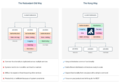
Why Kong
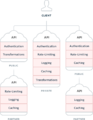
遗留架构
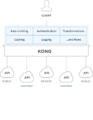
Kong架构

Kong集群

仪表盘APIs

仪表盘Consumers

仪表盘Plugins
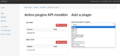
JUNGLE
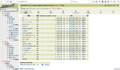
PostgreSQL
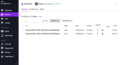
on DC/OS


[编辑] 链接
- Kong官网
- Kong @ GitHub
- Plugin Development Guide
- Public Lua API Reference
- Cassandra for Kong
- Kongdb - On demand Cassandra database for testing Kong
- Docker distribution for Kong
- How Mashape Manages Over 15,000 APIs & Microservices
分享您的观点

