欢迎大家赞助一杯啤酒🍺 我们准备了下酒菜:Formal mathematics/Isabelle/ML, Formal verification/Coq/ACL2/Agda, C++/Lisp/Haskell
PostgREST
来自开放百科 - 灰狐
(版本间的差异)
小 (→图集) |
小 (→项目) |
||
| (未显示1个用户的7个中间版本) | |||
| 第1行: | 第1行: | ||
| − | PostgREST: REST API for [[PostgreSQL]], [[Haskell]] 编写。 | + | PostgREST |
| + | |||
| + | [[文件:PostgREST-logo.png|right|PostgREST]] | ||
| + | |||
| + | ==简介== | ||
| + | PostgREST: [[REST]] [[API]] for [[PostgreSQL]], [[Haskell]] 编写。 | ||
| + | |||
| + | ==功能== | ||
| + | [[文件:postgrest-request-flow.png]] | ||
==指南== | ==指南== | ||
[[ng-admin]], [https://github.com/marmelab/ng-admin-postgrest ng-admin-postgrest] | [[ng-admin]], [https://github.com/marmelab/ng-admin-postgrest ng-admin-postgrest] | ||
| + | |||
| + | ==Identity== | ||
| + | [[文件:PostgREST-JWT.png|right|JWT]] | ||
| + | |||
| + | PostgREST 使用 [[JSON Web Token|JWT]] 作为身份认证机制。 | ||
| + | |||
| + | *使用 [https://github.com/michelp/pgjwt pgjwt] 在 SQL 中创建 JWT tokens | ||
| + | *使用 [https://www.postgresql.org/docs/current/pgcrypto.html pgcrypto module] 加密密码 | ||
| + | |||
| + | ==项目== | ||
| + | [https://postgrest.org/en/stable/ecosystem.html PostgREST ecosystem] | ||
| + | *[[Cardano]] [https://github.com/cardano-community/guild-operators/tree/alpha/files/grest Guild Operators] | ||
| + | *[[RabbitMQ]] [https://github.com/gmr/pgsql-listen-exchange PostgreSQL LISTEN Exchange] | ||
| + | *[https://github.com/john-kelly/elm-postgrest PostgREST in Elm] [[Elm]] | ||
==图集== | ==图集== | ||
<gallery> | <gallery> | ||
| − | ng-admin-postgrest.png|Ng-admin + PostgRest | + | image:ng-admin-postgrest.png|Ng-admin + PostgRest |
| + | image:PostgREST-deployment-diagram.png|PostgREST部署 | ||
</gallery> | </gallery> | ||
| 第17行: | 第40行: | ||
[[category:PostgreSQL]] | [[category:PostgreSQL]] | ||
[[category:haskell]] | [[category:haskell]] | ||
| + | [[category:Huihoo Foundation]] | ||
2022年2月15日 (二) 05:24的最后版本
PostgREST

目录 |
[编辑] 简介
PostgREST: REST API for PostgreSQL, Haskell 编写。
[编辑] 功能

[编辑] 指南
[编辑] Identity

PostgREST 使用 JWT 作为身份认证机制。
- 使用 pgjwt 在 SQL 中创建 JWT tokens
- 使用 pgcrypto module 加密密码
[编辑] 项目
[编辑] 图集
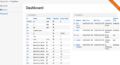
Ng-admin + PostgRest
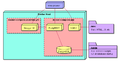
PostgREST部署


[编辑] 链接
分享您的观点

