欢迎大家赞助一杯啤酒🍺 我们准备了下酒菜:Formal mathematics/Isabelle/ML, Formal verification/Coq/ACL2/Agda, C++/Lisp/Haskell
Apache Usergrid/developer
小 (→Eclipse) |
小 (→编译) |
||
| (未显示1个用户的32个中间版本) | |||
| 第1行: | 第1行: | ||
[[Apache Usergrid]] 开发者 | [[Apache Usergrid]] 开发者 | ||
| + | |||
| + | ==编译== | ||
| + | * 2.x 编译 | ||
| + | 因为引入了 [[elasticsearch]] 所以编译环境有了更多要求,参考:[https://usergrid.apache.org/docs/installation/deployment-guide.html Usergrid 2.1.0 Deployment Guide] | ||
| + | |||
| + | * 1.x 编译 | ||
| + | 注意要使用 cassandra 2.x, tomcat 7.x 的版本 (不要使用3.x, 9.x的高版本),使用的 [https://github.com/apache/usergrid/releases/tag/1.0.2 Usergrid 1.0.2]。 | ||
| + | |||
| + | 下载后进入stack目录,执行:mvn clean install -DskipTests=true | ||
| + | |||
| + | 成功编译生成 stack/rest/target/ROOT.war | ||
| + | |||
| + | 将tomcat/webapps/ROOT目录删除,将ROOT.war复制到tomcat的webapps目录下。 | ||
| + | |||
| + | 在tomcat的lib目录下创建 usergrid-custom.properties 文件: | ||
| + | usergrid.sysadmin.login.allowed=true | ||
| + | usergrid.sysadmin.login.name=superuser | ||
| + | usergrid.sysadmin.login.password=pw123 | ||
| + | |||
| + | |||
| + | usergrid.management.mailer=Myself<[email protected]> | ||
| + | |||
| + | usergrid.test-account.admin-user.password=test | ||
| + | |||
| + | 设置用户数据库和管理数据库 | ||
| + | http://localhost:8080/system/database/setup | ||
| + | http://localhost:8080/system/superuser/setup | ||
| + | |||
| + | 查查数据库 | ||
| + | cqlsh> use system; | ||
| + | cqlsh:system> select * from schema_keyspaces; | ||
| + | cqlsh:system> use usergrid; | ||
| + | cqlsh:usergrid> desc keyspaces; | ||
| + | cqlsh:usergrid> desc tables; | ||
| + | cqlsh:usergrid> desc schema; | ||
| + | |||
| + | 系统状态 | ||
| + | http://localhost:8080/status | ||
| + | |||
| + | 编译部署Portal,需要[[node.js]],参考目录下的[https://github.com/apache/usergrid/blob/master/portal/README.md README.md]文件 | ||
| + | |||
| + | 可运行一个单独的轻量服务器 http://localhost:3000 也可部署到 tomcat 上。(最好单独部署,并部署到内网) | ||
| + | |||
| + | Usergrid_Applications' does not exist | ||
| + | |||
| + | performance编译 | ||
| + | grunt --gruntfile Perf-Gruntfile.js dev | ||
| + | |||
| + | ==Portal== | ||
| + | usergrid-1.0.2/stack/config/src/main/resources/usergrid-default.properties | ||
| + | usergrid.sysadmin.login.name=huihoo | ||
| + | |||
| + | usergrid.sysadmin.login.password=huihoo | ||
| + | usergrid.sysadmin.login.allowed=true | ||
| + | usergrid.sysadmin.approve.users=false | ||
| + | usergrid.sysadmin.approve.organizations=false | ||
| + | 修改编译重新部署 | ||
| + | |||
| + | 常见问题:[https://stackoverflow.com/questions/23588140/cannot-login-to-apache-usergrid-deployed-on-tomcat7 Cannot login to Apache Usergrid deployed on Tomcat7] | ||
| + | |||
| + | ==Apigee== | ||
| + | *[https://apigee.com/about/press-release/apigee-acquires-mobile-app-api-provider-usergrid Apigee Acquires Mobile App API Provider Usergrid] Usergrid founder and CEO [https://github.com/edanuff Ed Anuff] has joined Apigee's leadership team, where he will continue to guide the development of Usergrid software. | ||
| + | *[http://docs.apigee.com/app-services/content/rest-endpoints REST Endpoints] | ||
| + | https://api.usergrid.com/status | ||
| + | https://apigee.com/appservices | ||
| + | Apigee为组织默认创建了 sandbox 应用,开发者可基于它进行curl操作。如,同时创建 collection 和 entity | ||
| + | |||
| + | curl -X POST "https://api.usergrid.com/huihoo/sandbox/item" -d '{"name":"milk", "price":"3.25"}' | ||
| + | |||
| + | 一步步来,先创建一个 book 的 collection ,并 post 第一本书 | ||
| + | { "name":"Effective Akka" } | ||
| + | 然后 | ||
| + | curl -X PUT https://api.usergrid.com/{huihoo}/sandbox/books/?ql= -d '{ "author" : "Allen" }' | ||
| + | curl -X GET https://api.usergrid.com/{huihoo}/sandbox/books | ||
| + | [http://docs.apigee.com/tutorials/create-collection 更多细节>>>] | ||
| + | |||
| + | 图片,asset, file 管理: | ||
| + | curl -X POST -i -F name='image1' -F [email protected] 'https://api.usergrid.com/huihoo/sandbox/pictures/' | ||
| + | curl -X GET -H 'Accept: image/jpeg' 'https://api.usergrid.com/huihoo/sandbox/pictures/image1' | ||
| + | |||
| + | ==通知服务== | ||
| + | [https://usergrid.apache.org/docs/push-notifications/registering.html 注册 Apple APNs or Google GCM] | ||
| + | |||
| + | ==数据库存储== | ||
| + | 关系型数据库、Cassandra、Usergrid对应关系 | ||
| + | {| class="wikitable" | ||
| + | |- | ||
| + | ! Relational | ||
| + | ! Cassandra | ||
| + | ! Usergrid | ||
| + | |- | ||
| + | | A row. | ||
| + | | A row. | ||
| + | | An entity. 存储为JSON file | ||
| + | |- | ||
| + | | A column. | ||
| + | | A column. 支持数以千计的列 | ||
| + | | A entity property. 也包含entity’s UUID | ||
| + | |- | ||
| + | | A table. | ||
| + | | A column family. | ||
| + | | An entity collection. | ||
| + | |} | ||
| + | 关系型数据库 | ||
| + | [[文件:products-rdbms-table.png]] | ||
| + | |||
| + | Cassandra | ||
| + | [[文件:products-cassandra-column-family.png]] | ||
| + | |||
| + | JSON 文件 | ||
| + | { | ||
| + | "action" : "get", | ||
| + | "application" : "<app_uuid>", | ||
| + | "params" : {}, | ||
| + | "path" : "/products", | ||
| + | "uri" : "https://api.usergrid.com/my_org/my_app/products", | ||
| + | "entities" : [ { | ||
| + | "uuid" : "<product_uuid>", | ||
| + | "type" : "product", | ||
| + | "created" : 1395410098517, | ||
| + | "modified" : 1395410098517, | ||
| + | "image" : "http://path.jpg", | ||
| + | "metadata" : { | ||
| + | "path" : "/products/<product_uuid>" | ||
| + | }, | ||
| + | "name" : "Bouncy Castle", | ||
| + | "sku" : "35450349822" | ||
| + | }, | ||
| + | { | ||
| + | "uuid" : "<product_uuid>", | ||
| + | "type" : "product", | ||
| + | "created" : 1395409669686, | ||
| + | "modified" : 1395409669686, | ||
| + | "image" : "http://path.jpg", | ||
| + | "metadata" : { | ||
| + | "path" : "/products/<product_uuid>" | ||
| + | }, | ||
| + | "description" : "It makes coffee.", | ||
| + | "name" : "Coffee Maker", | ||
| + | "sku" : "60723023589" | ||
| + | }, | ||
| + | { | ||
| + | "uuid" : "<product_uuid>", | ||
| + | "type" : "product", | ||
| + | "created" : 1395407700578, | ||
| + | "modified" : 1395407700578, | ||
| + | "metadata" : { | ||
| + | "path" : "/products/<product_uuid>" | ||
| + | }, | ||
| + | "name" : "Air Mattress", | ||
| + | "sku" : "53045985365" | ||
| + | }], | ||
| + | "timestamp" : 1396290037640, | ||
| + | "duration" : 91, | ||
| + | "organization" : "my_org", | ||
| + | "applicationName" : "my_app", | ||
| + | "count" : 3 | ||
| + | } | ||
==Eclipse== | ==Eclipse== | ||
| − | 导入Usergrid mvn项目,会自动importing | + | 导入Usergrid mvn项目,会自动importing Maven项目,或者: |
| + | cd stack | ||
| + | mvn clean package -DskipTests=true | ||
==IDEA== | ==IDEA== | ||
| + | |||
| + | ==测试框架== | ||
| + | [[Judo chop]] | ||
| + | |||
| + | ==代码覆盖== | ||
| + | 使用 [http://eclemma.org/jacoco/index.html JaCoCo Java Code Coverage Library] 做代码覆盖测试。 | ||
| + | |||
| + | ==持续集成== | ||
| + | |||
| + | ==图集== | ||
| + | <gallery> | ||
| + | image:Usergrid-Apple-APNs.png|Apple APNs | ||
| + | image:Usergrid-Google-GCM.png|Google GCM | ||
| + | image:usergrid-security-token-authentication.png|安全和身份认证 | ||
| + | image:apigee-appservices.png|Apigee | ||
| + | image:apigee-api-performance.png|API性能 | ||
| + | </gallery> | ||
==链接== | ==链接== | ||
| + | *[https://cwiki.apache.org/confluence/display/usergrid/Usergrid+Contribution+Workflow Usergrid Contribution Workflow] | ||
| + | *[https://github.com/easemob 环信 @ GitHub] | ||
| + | *[http://docs.apigee.com/api-baas Apigee API BaaS] | ||
[[category:developer]] | [[category:developer]] | ||
| + | [[category:usergrid]] | ||
| + | [[category:apache]] | ||
| + | [[category:node.js]] | ||
| + | [[category:angular]] | ||
| + | [[category:clojure]] | ||
| + | [[category:scala]] | ||
| + | [[category:swift]] | ||
| + | [[category:HTML5]] | ||
| + | [[category:huihoo]] | ||
2016年6月6日 (一) 02:50的最后版本
Apache Usergrid 开发者
目录 |
[编辑] 编译
- 2.x 编译
因为引入了 elasticsearch 所以编译环境有了更多要求,参考:Usergrid 2.1.0 Deployment Guide
- 1.x 编译
注意要使用 cassandra 2.x, tomcat 7.x 的版本 (不要使用3.x, 9.x的高版本),使用的 Usergrid 1.0.2。
下载后进入stack目录,执行:mvn clean install -DskipTests=true
成功编译生成 stack/rest/target/ROOT.war
将tomcat/webapps/ROOT目录删除,将ROOT.war复制到tomcat的webapps目录下。
在tomcat的lib目录下创建 usergrid-custom.properties 文件:
usergrid.sysadmin.login.allowed=true
usergrid.sysadmin.login.name=superuser
usergrid.sysadmin.login.password=pw123
[email protected]
[email protected]
usergrid.management.mailer=Myself<[email protected]>
[email protected]
usergrid.test-account.admin-user.password=test
设置用户数据库和管理数据库
http://localhost:8080/system/database/setup
http://localhost:8080/system/superuser/setup
查查数据库
cqlsh> use system;
cqlsh:system> select * from schema_keyspaces;
cqlsh:system> use usergrid;
cqlsh:usergrid> desc keyspaces;
cqlsh:usergrid> desc tables;
cqlsh:usergrid> desc schema;
系统状态
http://localhost:8080/status
编译部署Portal,需要node.js,参考目录下的README.md文件
可运行一个单独的轻量服务器 http://localhost:3000 也可部署到 tomcat 上。(最好单独部署,并部署到内网)
Usergrid_Applications' does not exist
performance编译
grunt --gruntfile Perf-Gruntfile.js dev
[编辑] Portal
usergrid-1.0.2/stack/config/src/main/resources/usergrid-default.properties
usergrid.sysadmin.login.name=huihoo
[email protected]
usergrid.sysadmin.login.password=huihoo
usergrid.sysadmin.login.allowed=true
usergrid.sysadmin.approve.users=false
usergrid.sysadmin.approve.organizations=false
修改编译重新部署
常见问题:Cannot login to Apache Usergrid deployed on Tomcat7
[编辑] Apigee
- Apigee Acquires Mobile App API Provider Usergrid Usergrid founder and CEO Ed Anuff has joined Apigee's leadership team, where he will continue to guide the development of Usergrid software.
- REST Endpoints
https://api.usergrid.com/status
https://apigee.com/appservices
Apigee为组织默认创建了 sandbox 应用,开发者可基于它进行curl操作。如,同时创建 collection 和 entity
curl -X POST "https://api.usergrid.com/huihoo/sandbox/item" -d '{"name":"milk", "price":"3.25"}'
一步步来,先创建一个 book 的 collection ,并 post 第一本书
{ "name":"Effective Akka" }
然后
curl -X PUT https://api.usergrid.com/{huihoo}/sandbox/books/?ql= -d '{ "author" : "Allen" }'
curl -X GET https://api.usergrid.com/{huihoo}/sandbox/books
图片,asset, file 管理:
curl -X POST -i -F name='image1' -F [email protected] 'https://api.usergrid.com/huihoo/sandbox/pictures/'
curl -X GET -H 'Accept: image/jpeg' 'https://api.usergrid.com/huihoo/sandbox/pictures/image1'
[编辑] 通知服务
[编辑] 数据库存储
关系型数据库、Cassandra、Usergrid对应关系
| Relational | Cassandra | Usergrid |
|---|---|---|
| A row. | A row. | An entity. 存储为JSON file |
| A column. | A column. 支持数以千计的列 | A entity property. 也包含entity’s UUID |
| A table. | A column family. | An entity collection. |
关系型数据库

Cassandra

JSON 文件
 {
    "action" : "get",
    "application" : "<app_uuid>",
    "params" : {},
    "path" : "/products",
    "uri" : "https://api.usergrid.com/my_org/my_app/products",
    "entities" : [ {
        "uuid" : "<product_uuid>",
        "type" : "product",
        "created" : 1395410098517,
        "modified" : 1395410098517,
        "image" : "http://path.jpg",
        "metadata" : {
            "path" : "/products/<product_uuid>"
        },
        "name" : "Bouncy Castle",
        "sku" : "35450349822"
    },
    {
        "uuid" : "<product_uuid>",
        "type" : "product",
        "created" : 1395409669686,
        "modified" : 1395409669686,
        "image" : "http://path.jpg",
        "metadata" : {
            "path" : "/products/<product_uuid>"
        },
        "description" : "It makes coffee.",
        "name" : "Coffee Maker",
        "sku" : "60723023589"
    },
    {
        "uuid" : "<product_uuid>",
        "type" : "product",
        "created" : 1395407700578,
        "modified" : 1395407700578,
        "metadata" : {
            "path" : "/products/<product_uuid>"
        },
        "name" : "Air Mattress",
        "sku" : "53045985365"
    }],
    "timestamp" : 1396290037640,
    "duration" : 91,
    "organization" : "my_org",
    "applicationName" : "my_app",
    "count" : 3
}
[编辑] Eclipse
导入Usergrid mvn项目,会自动importing Maven项目,或者:
cd stack
mvn clean package -DskipTests=true
[编辑] IDEA
[编辑] 测试框架
[编辑] 代码覆盖
使用 JaCoCo Java Code Coverage Library 做代码覆盖测试。
[编辑] 持续集成
[编辑] 图集
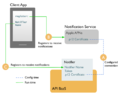
Apple APNs
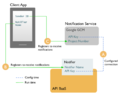
Google GCM
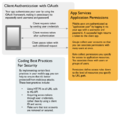
安全和身份认证
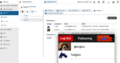
Apigee
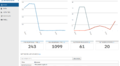
API性能


